 Futurion Solutions
Free · Open source · No account
 TrustPaste
Your Reusable Text, Ready in Any Web Form
Company descriptions, security answers, your CV or any text you copy and paste again and again: save it once and put it into the form with a keyboard shortcut. Nothing leaves your browser.
Who it is for
For anyone who fills in the same forms again and again
Company descriptions in several lengths, tender answers, your CV: what you copy and paste again and again lives in scattered documents. TrustPaste keeps it in one place and lets you pick what each field asks for.
Sales
Supplier portals, tender platforms, customer questionnaires. Less time hunting for the right 300-character description and more time with customers.
Marketing
Directories, marketplaces, event and partner portals. The same information in a short, long, technical or English version, and the same for the whole team.
Management
When a registration or questionnaire asks for the company history, the services and the compliance position, it no longer has to pass through three people.
Job hunting
Experience, education, a professional summary and links, ready for each application form, without reopening your CV every time.
What it keeps
Everything you repeat in forms
Browser autofill is good for a name and an address. TrustPaste is for the long pieces of text you reuse: company text, CV text or anything else.
Descriptions in several lengths
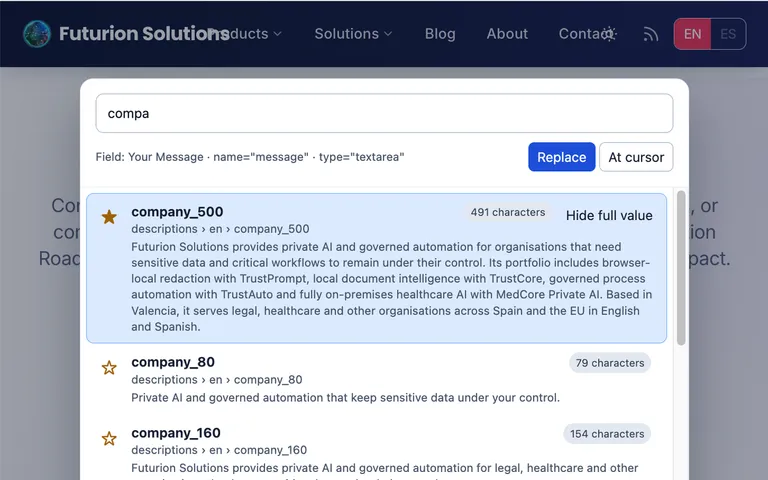
The 80-character version, the 160 and the 500. As you choose, you see how long each one is, and TrustPaste warns you if it does not fit the field.
Products and services
What each product does, how each service is delivered and examples of use by sector.
Security and tender answers
How you handle data, which controls you have, the standard answers you have already given before.
In English and in Spanish
If the page is in English, TrustPaste shows the English version first, and the other way round.
Your CV
Professional summary, work experience, education, skills and links, in the short and long versions that application forms ask for.
Anything else you repeat
Standard replies to customers, support answers, incident descriptions: if you copy and paste it often, you can keep it here.
How it works
How You Fill In a Form
You choose which text goes in each field. TrustPaste only saves you looking for it.
Your data
Your text does not leave your browser
No account, no cloud
There is nothing to sign up for. Your text is kept in your browser, with no sync, no telemetry and no analytics.
It does not touch sensitive fields
It refuses to write into password, one-time-code and payment fields, and checks again just before inserting.
Free and open
No cost and no paid version. The code is published on GitHub (Unlicense) for anyone who wants to review it.
For your IT lead
The technical details
Minimal permissions
Only storage, contextMenus, activeTab and scripting, with no host permissions: it cannot read a page until you open the extension there.
No remote code
Extension pages run under a strict content security policy, with no remote code and no remote resources.
Supported fields
Text, URL, email, telephone, search, number, text areas and editable content. It also refuses hidden, file, read-only and disabled fields.
Browsers
Chrome, Edge and Brave on desktop, from the Chrome Web Store. The imported file can be up to 5 MB and is treated as untrusted data: it is never run as code.