Futurion Solutions
· Ivan Skachkov · AI Infrastructure · 9 min read
From a Customer Question to $0.80 per Minute of Generated AI Video.
How a customer question led to an AI video generation proof of concept and a comparison of GPU costs.

It started with a regular customer meeting.
We had scheduled one of our discovery calls. The customer was looking for ways to improve their Governance, Risk, and Compliance processes with our GRC automation service.
Nothing unusual for us. This is exactly the kind of conversation we have with companies trying to reduce manual work, improve internal processes, and understand what can realistically be automated.
But somewhere in the middle of the conversation, we went completely off-topic.
The customer started talking about their marketing pipeline.
They were producing videos using AI, including dubbing content into different languages.
Nothing to do with GRC.
Then came a question I wasn’t expecting:
“By the way, if you do local AI, can you make this run locally for us?”
Interesting question.
We work with local models. Gemma, MedGemma, Qwen, Mistral — these are some of the model families we deal with, mostly for text-related tasks.
But video production and dubbing?
We had never seriously explored that area.
If we can run language models locally, why shouldn’t we be able to do something similar with video and audio?
What would it take?
What would actually work?
And how much of the existing production pipeline could stay under the customer’s own control instead of depending entirely on a commercial video generation service?
To be honest, I couldn’t sleep that night.
The Next Morning, We Started Looking for Answers
The next morning, my team and I started researching what was actually available.
At first, the task sounded relatively simple.
Find an open-weight video generation model, deploy it on locally, and see whether we could produce something comparable to the commercial services the customer was already using.
But characters had to remain recognizable across different scenes. Voice and sound were important parts of the production process.
Video quality 720p
24 frames per second
generate videos using reference images
existing video
Use audio
That shortened our list considerably.
We looked at Wan 2.2, LTX-2.3, LTX-2.5, HunyuanVideo, and MiniMax H3.
But we weren’t looking for a model that could simply animate a picture.
We needed something capable of working with several types of references while producing synchronized audio and keeping characters reasonably consistent.
During the research, MiniMax H3 — and particularly MiniMax H3 Ref2VA — caught our attention.
Two and a half hours to generate five seconds video!
Our initial environment was an Apple M2 Pro with 32 GB.
We wanted to understand what was possible with hardware we already had before moving to something more expensive.
And it worked.
We generated a 5.17 seconds video.
704 × 1280
Resolution
24 fps
Frame rate
Stereo
audio included
2 hours, 30 minutes, and 16 seconds.
Eight denoising steps alone consumed around 142 minutes. Video decoding added another 7.7 minutes. Peak GPU memory usage reached 20.06 GB.
So yes, the pipeline worked.
But clearly this wasn’t something we could recommend for a customer’s AI video production process.
The model wasn’t the immediate problem.
Hardware was.
We Needed GPU Power
What GPU would make this practical?
We started looking at V100, V100S, L4, A100, and RTX PRO Blackwell configurations.
VRAM, inference performance, quantization, model offloading — suddenly all of these became part of the conversation.
For this particular workload, our research pointed toward GPUs with at least 32 GB of VRAM as a more practical starting point.
Then came another question.
Where should we run them?
We looked at providers such as Hetzner and OVH, but dedicated-server pricing didn’t make much sense for an experiment.
We didn’t need a GPU server running 24 hours a day.
We wanted to launch one, test the model, shut it down, and pay for what we actually used.
That’s how we arrived at RunPod.
Hourly GPU rental was interesting. Persistent storage was useful.
But something else attracted my attention…
ComfyUI Is Like n8n, But for Models
By this point, we already had the video generation pipeline running on Mac.
We didn’t need ComfyUI to prove the model could run.
What I liked was the interface.
If you’ve worked with n8n, you’ll recognize the basic concept.
In n8n, you connect nodes to automate processes between applications and services.
ComfyUI uses a similar visual approach, but for generative models.
You connect nodes for loading models, adding image, video, and audio references, configuring generation parameters, and producing the final output.
You can see the entire pipeline in front of you.
You can change individual steps without constantly modifying scripts.
For me, that was much more convenient than doing everything through GitHub.
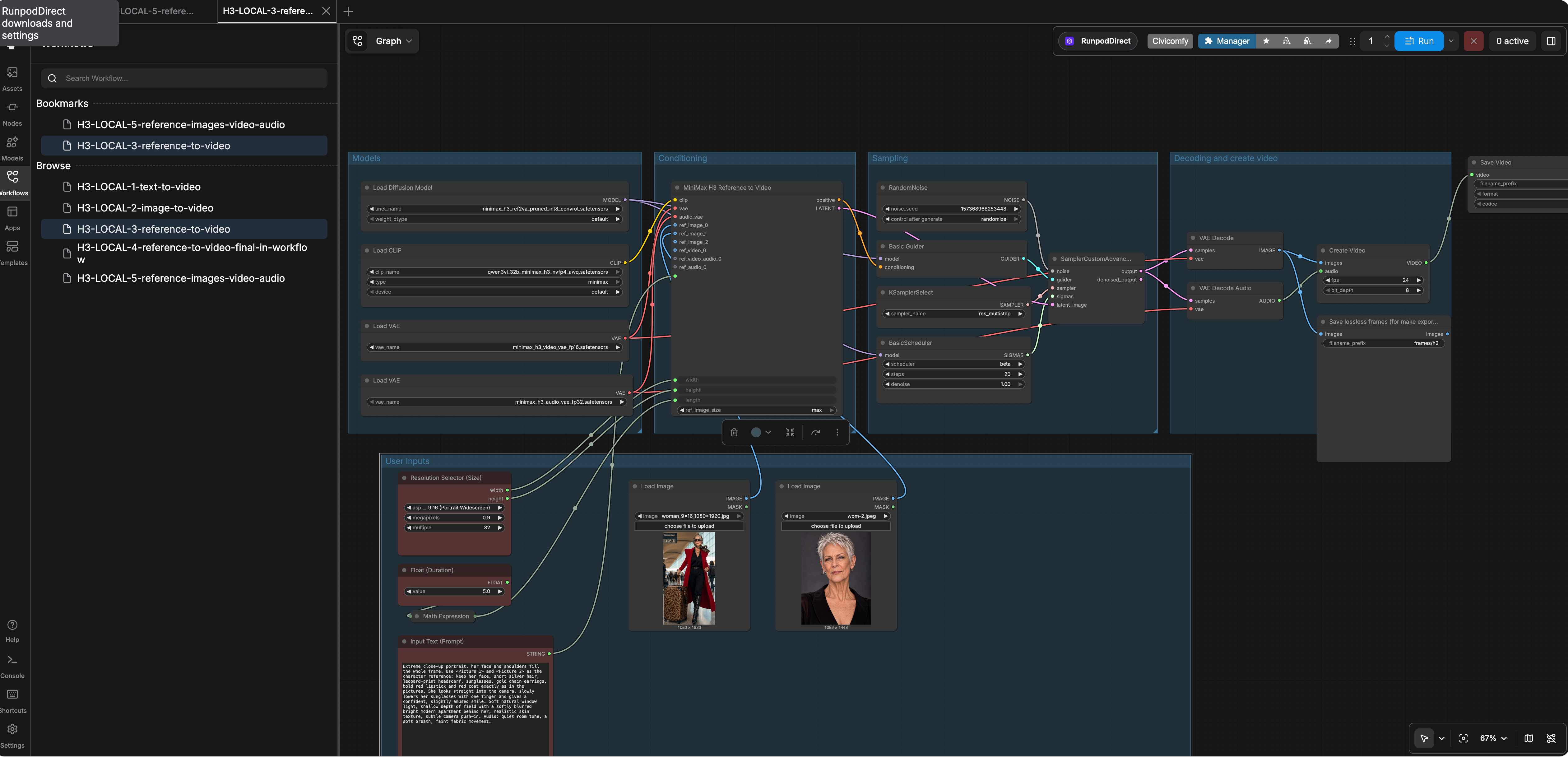
So for the proof of concept, the direction became clear:
Not Every RTX 5090 Performs Like an RTX 5090
Then things became more interesting.
We started experimenting with RunPod Community Cloud.
The idea sounded good: rent an RTX 5090 at Community pricing, generate the videos, terminate the GPU when finished.
But we noticed something unexpected.
Some RTX 5090 hosts had a GPU power limit of only 400 W.
And the performance difference was enormous.
On one Community host, we measured:
86.9 seconds per sampling step.
On a Secure Cloud host:
15.6 seconds.
More than five times faster.
At first, it looked like Community Cloud might simply be too unpredictable.
Then we found another Community RTX 5090 with a 536 W power limit.
Its result:
15.1 seconds per sampling step.
Almost identical to Secure Cloud.
So the problem wasn’t simply:
Community Cloud bad. Secure Cloud good.
The actual problem was:
How do we find a good GPU before spending time and money downloading models and attempting a generation?
Find a GPU
Normally, you launch the GPU, connect to it, download the models, and start generating.
But if the machine turns out to be slow or unreliable, you’ve already wasted time.
Our pruned model set was approximately 72 GB.
Downloading 72 GB before discovering that the GPU is useless is not a great workflow.
So we added GPU discovery to our deployment script.
The logic is relatively simple.
Our script can:
- Request an RTX 5090 Community Cloud pod with 120 GB of disk space.
- Wait for SSH and verify CUDA availability through PyTorch or ComfyUI.
- Check the GPU power limit.
- Sample idle GPU utilization.
- Reject hosts reporting less than 500 W or averaging more than 20% GPU utilization before our workload starts.
- Terminate the rejected pod, wait two minutes, and try again.
A cheaper GPU per hour doesn’t necessarily produce cheaper video.
Once the pipeline was stable enough to test repeatedly, we started measuring generation time and infrastructure cost.
For consistency, we used a five-second workload with 20 sampling steps at 736 × 1312 resolution.
We compared three configurations.
| GPU configuration | Generation time per 5-second clip | Cost per generated video minute |
|---|---|---|
| Community — pruned models, fast host | 5.7 min | $0.80 |
| Secure — pruned models | 6.7 min | $1.61 |
| Secure — full models | 8.2 min | $2.05 |
The result was interesting.
When we found a fast Community host, the estimated infrastructure cost was approximately half the Secure Cloud cost.
But on slower Community machines, the projected cost increased to roughly $3.20–$4.90 per generated video minute.
Which leads to a fairly simple conclusion:
If generation takes longer, you’re paying for that additional runtime.
In our measurements, Community Cloud only remained cheaper than Secure Cloud when the host completed a sampling step in approximately 31 seconds or less.
That is exactly why our GPU discovery script became useful.
These numbers include estimated storage charges but exclude startup time, idle resources, failed generations, editing, and other production overhead.
And What About Startup Time?
Cost wasn’t the only thing that mattered.
We also wanted to understand what happens when somebody actually wants to start working.
With a new Community Cloud pod using the pruned model set, our measurements were approximately:
- 10 minutes to download around 72 GB of models.
- 5.7 minutes to generate the first five-second clip on a fast RTX 5090.
So roughly 16 minutes from finding the GPU to receiving the first result.
But that does not include GPU discovery.
If RTX 5090 capacity is limited, or several hosts fail our checks, the customer may wait significantly longer.
Secure Cloud behaved differently.
A clean deployment with the pruned models was estimated to need around 3.5 minutes of preparation, followed by approximately 6.7 minutes for generation.
Roughly 10 minutes to the first five-second video.
And when the models were already stored on a persistent volume, a warm restart reached verification in just 65 seconds.
The difference wasn’t only cost.
It was predictability.
Secure Cloud or Community Cloud?
At this point, we had two practical deployment options.
Secure Cloud
Start a more predictable environment, get more consistent performance and availability, and pay a higher hourly price.
This makes sense when somebody generates videos regularly and doesn’t want to wait for a suitable Community GPU.
Community Cloud
Launch our discovery script and let it search for an acceptable RTX 5090.
Once it finds one, prepare the environment and start generating.
When the script finds a fast host, infrastructure cost can be approximately half the Secure Cloud cost.
The tradeoff is potentially longer startup time and less predictable availability.
There is no reason to pretend that one option is universally better.
Let the customer decide whether cost or predictability matters more.
And there is another important distinction.
Both of these options still use rented GPU infrastructure.
They provide more control over the execution environment and the models we run, but they are not the same as running everything on physical hardware inside the customer’s own infrastructure.
Does any of this actually make financial sense?
Commercial video services already exist.
You subscribe, upload your references, generate your video, and pay for the credits.
Why bother with models, GPUs, scripts, storage, deployment?
We used Seedance 2.0 Fast as the reference as our customer base model.
Using our assumed consumption rate of 24 credits per second, one minute of generated video requires 1,440 credits.
The effective cost depends on the subscription plan.
For our own pipeline, we used the generation times and infrastructure costs from our RunPod experiments.
| Solution | Cost per generated video minute |
|---|---|
| Seedance 2.0 Fast — Standard | $34.56 |
| Seedance 2.0 Fast — Pro | $22.40 |
| Seedance 2.0 Fast — Max | $14.40 |
| Seedance 2.0 Fast — Team | $7.20 |
| RunPod Community — pruned models | $0.80 |
| RunPod Secure — pruned models | $1.61 |
| RunPod Secure — full models | $2.05 |
The difference is substantial.
Even compared with the cheapest Seedance option Team plan, our Secure Cloud full-model configuration came out around 72% cheaper.
And Community configuration reached approximately $0.80 per generated minute.
That’s around nine times cheaper than the Seedance Team figure in our comparison.
What Started as a GRC Conversation
We started with GRC and ended up building a video generation pipeline.
Not exactly what we had planned.
But that’s what I like about working directly with customers. Sometimes the most interesting projects start with a question that has nothing to do with the original meeting.
We had to investigate, experiment, fail a few times, and figure things out.
Now we have a working proof of concept, actual performance measurements, and a much better understanding of the costs.
Is it worth exploring?
Based on our results, absolutely.
So here’s my question to you.
Is there something in your company that you assume could be automated or improved?
Something you’ve never considered running on your own infrastructure?
Tell us about it.
Maybe your question will become our next experiment.